

This guide is in English for now. The tool itself works in your language.
Credit Note › Help › Making it
How to make a GST credit note
A credit note lowers an invoice already issued: goods returned, a price cut, a discount after the sale, or tax charged too high. Never edit the old invoice; issue a credit note for the difference.
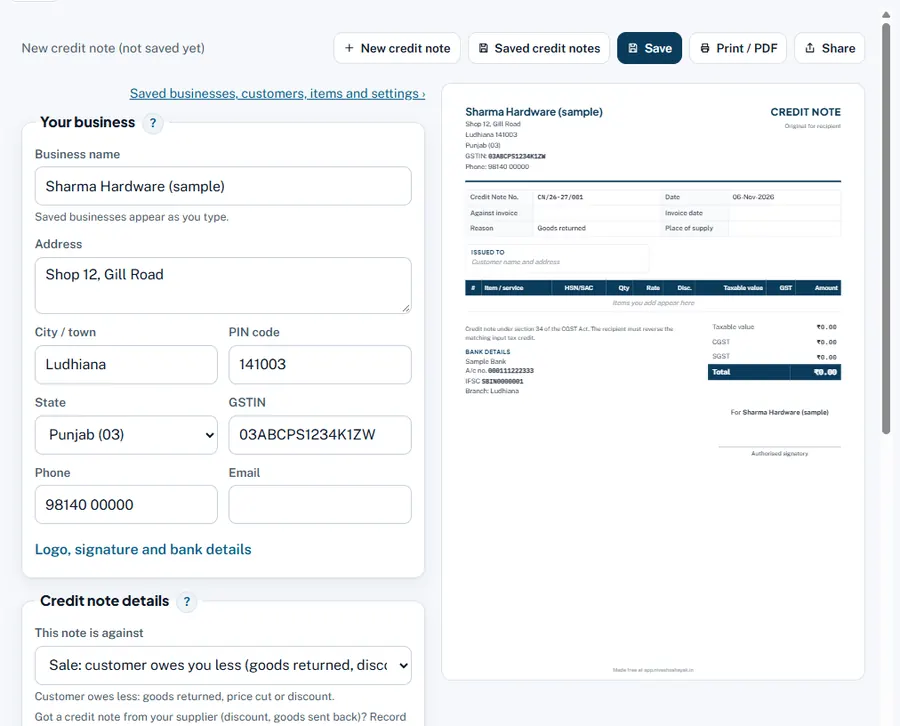
Step by step
- This note is against: Sale. For a note to your customer (the usual case). For a supplier, see sale or purchase side.
- Credit note details. Number, Date, Original invoice number and Original invoice date.
- Reason. Goods returned, Price reduced, Discount after sale, Short or damaged supply, Tax charged in excess or Other. It prints on the note.
- Issued to. The customer of the original invoice.
- Items: only the difference. Returned quantity at the invoice rate, or the price difference, with the same HSN and GST rate.
- Save, print, share. In the App the note lowers what the customer owes; returned goods come back into stock.
Worked example
Invoice INV/26-27/045: 100 units at ₹500 + 18% to a buyer in your state. 10 units come back damaged. Credit note CN/26-27/006, reason Goods returned: 10 × ₹500 = ₹5,000, CGST ₹450 + SGST ₹450, total ₹5,900. The customer now owes ₹5,900 less.
Rules and dates
Section 34 of the CGST Act. Declare the credit note in GSTR-1 by 30 November after the end of the financial year (or the annual return date, if earlier). For a discount after the sale, since 1 November 2026 a prior agreement and invoice-wise linking are no longer needed, but the buyer must reverse the matching input tax credit (Finance Act 2026).
Common mistakes and how to fix them
- Putting the whole invoice on the note. Only the part returned or reduced.
- Wrong GST rate on the note. Use the rate of the original invoice.